|
|
| Line 19: |
Line 19: |
| | | | |
| | The SuperPawn Vault is a feature that helps keep track of how much money you have in your store and in what denominations. It also adds a layer of security by giving each teller his/her own password and drawer assignment. | | The SuperPawn Vault is a feature that helps keep track of how much money you have in your store and in what denominations. It also adds a layer of security by giving each teller his/her own password and drawer assignment. |
| − |
| |
| − | ==== Disburse From Vault ====
| |
| − |
| |
| − | [[File:Superpawn-Disburse-vault.png|thumb|SuperPawn Disburse from Vault Screen]]
| |
| − |
| |
| − | This screen has options to put money from the vault to:
| |
| − | *Cash drawers
| |
| − | *Misc out
| |
| − | *Bank Deposits
| |
| − | {{clear-float-all}}
| |
| − | ==== Receive Into Vault ====
| |
| − |
| |
| − | [[File:Superpawn-Receive-vault.png|thumb|SuperPawn Receive Into Vault Screen]]
| |
| − |
| |
| − | This screen has options to put money in the vault from:
| |
| − | *Cash Draws
| |
| − | *Misc in
| |
| − | {{clear-float-all}}
| |
| − |
| |
| − | ==== Vault Inquiry ====
| |
| − |
| |
| − | [[File:Superpawn-vault-Inquiry.png|thumb|SuperPawn Vault Inquiry Screen]]
| |
| − |
| |
| − | This screen allows you to see:
| |
| − | *what is in the vault and what has been disbursed out of and received into the vault.
| |
| − | *It has the denominations of what is currently in the vault currently.
| |
| − | *A print button to print the current denominations and disburse and received transactions.
| |
| − | *A button to view disburse and received transactions.
| |
| − |
| |
| − | [[File:Superpawn-vault-Inquiry-Veiw.png|thumb|SuperPawn Vault Inquiry view Screen]]
| |
| − |
| |
| − | {{clear-float-all}}
| |
| − |
| |
| − | ==== Transfer Between Drawers ====
| |
| − |
| |
| − | [[File:Superpawn-vault-transfer-between-drawers.png|thumb|SuperPawn Transfer Between Cash Drawers Screen]]
| |
| − |
| |
| − | This screen will allow you to:
| |
| − | *Transfer money from one drawer to another.
| |
| − | *misc input money into a drawer
| |
| − | *misc output money from a drawer
| |
| − |
| |
| − | It also allows for remarks on why you are doing the transaction and puts the remarks in the end of day [[journal]].
| |
| − | {{clear-float-all}}
| |
| | | | |
| | ==Help & Support== | | ==Help & Support== |
This article is a stub. You can help XcelData Wiki by expanding it.
Features
Pawn2ME
Main Page: Pawn2ME Integration
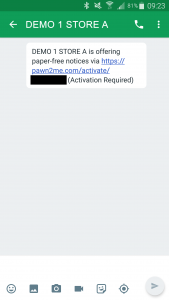
The first thing the customer will see
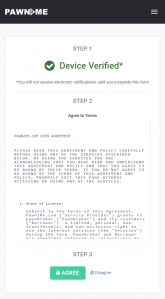
The customer must agree to our terms
Cash Drawers And Vault
Main Page: Cash Drawer & Vault System
The SuperPawn Vault is a feature that helps keep track of how much money you have in your store and in what denominations. It also adds a layer of security by giving each teller his/her own password and drawer assignment.
Help & Support
Main Page: SuperPawn Support Home
Builds


